
 Brijesh Desai
As we know, Instagram is one of the most powerful and successful social media with more than four hundred million active daily users, and the app’s update has some interesting and fun features from time to time. Instagram, which is owned by Facebook, has sought to create ad models to enable brands and businesses to advertise and market their goods themselves.
Now let’s proceed, what is a payment account on Instagram? Many of you may already be aware of it, but for those who are new to Instagram and couldn’t able to find the payment options. Instagram offers a feature that can allow paid search opportunities. The following steps will help you to register your card (debit or credit) as you would have to create a profile and also attach a security pin. so that you can buy Instagram goods and reservations without having to leave or go through complicated processes directly. This feature sure helps also in generating traffic for business adverts because everybody would want a positively progressive platform.
Without any further delay, let us proceed to the steps right away.
How to Add payment method on Instagram
1. Launch the Instagram app.
2. Go to your profile.
3. Tap on the three vertically arranged dots at the top right.
4. Tap on payments

5. Tap on “Add debit or credit card”.
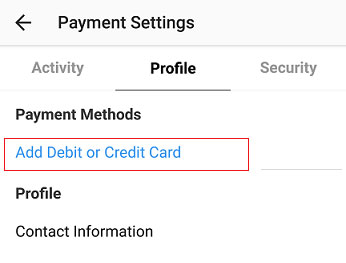
6. Input your card details and tap on save.

If these steps are followed properly I am sure you will able to now know how to add payment method on Instagram. The steps are quite easy, by inputting your correct card details and security pin, you would have created a profile that will enable you to make purchases with ease and also you can make payment for paid ads.
You must take care when attempting to incorporate payment methods; you must enter correct card information, right security code and billing your zip code. You can also add security, to restrict unauthorized access.
Frequently asked question and answers
Q: After I added payment method in Instagram, can I remove or change the payment details?
A: Indeed, you may, it is the same process that you need to follow to remove it or add new details.
Q: What sort of card would I use to attach Instagram payment?
A: Any valid debit or credit card is appropriate, only insure that the right data are entered.