
 Brijesh Desai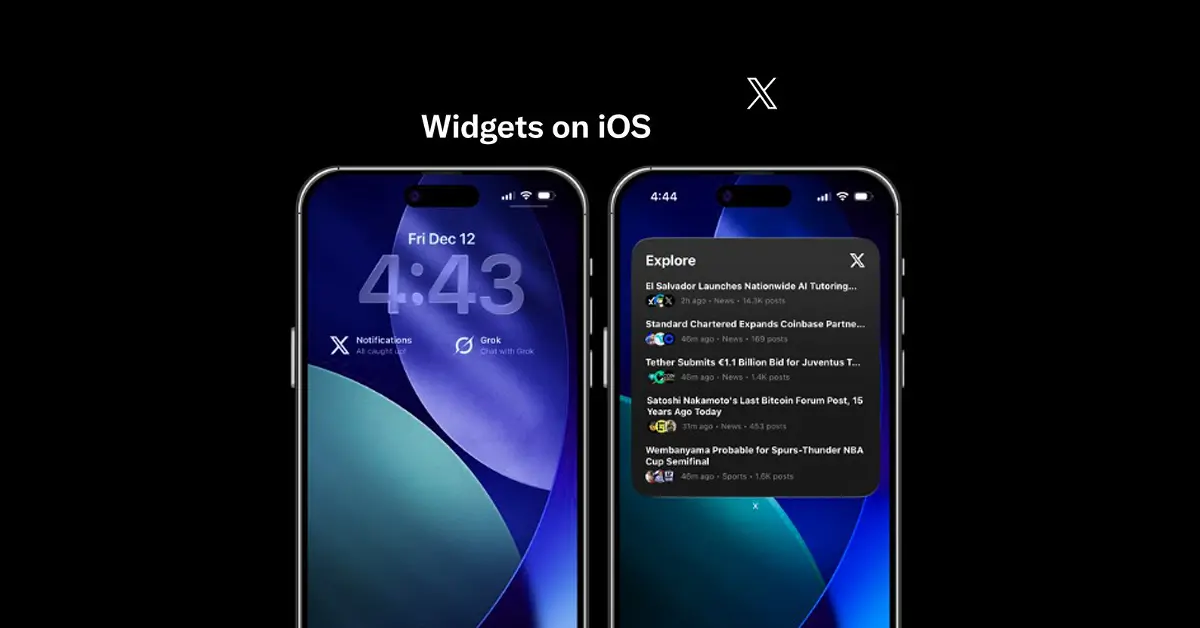
X widgets iOS now live—add custom feeds, trending topics, profile stats directly to iOS home screen. X app widget guide for iPhone, iPad, Lock Screen personalization explained.
X widgets iOS just transformed the X app from blue bird cage to personal dashboard—drag custom feeds, trending lists, profile stats right onto your iPhone home screen. No more app-swiping during commutes; glance at Musk’s latest, your niche follows, or follower count spikes. Launched quietly last week, this native iOS widget suite rivals Notion dashboards while keeping X’s real-time edge. I’ve pinned “AI News” + “India Tech” + “My Mentions”—morning scroll done in 30 seconds.
Widgets scale small/medium/large: tiny shows follower delta (+47 today!), medium packs 4 tweet previews, large feeds infinite scroll. Lock Screen widgets overlay notifications—perfect for iPhone 16 Pro Max always-on. Syncs across devices; iPad widgets span full-width for desktop vibes.
How X Widgets iOS Actually Work
Home Screen Setup (iOS 18.2+):
-
Long-press home → “+” → Search “X”
-
Small: Profile pic + follower change
-
Medium: 2×2 tweet grid (your feed/curated list)
-
Large: 4×2 infinite feed + quick reply
-
Tap → Customize source (Home, List, Community, Trends)
Lock Screen Magic:
-
Swipe Lock → Customize → Widgets → X Small/Medium
-
Shows latest @ mention or breaking news ticker
Pro Customizations:
✅ "My VIPs" list → Elon, @perplexity_ai, @naval

✅ "India Tech" → @NithinKamath, @deeptechindia

✅ "Breaking" → World News community feed

✅ "Stats" → Followers gained, impressions 24hr
Dark mode syncs perfectly; Live Activities push breaking tweets to Dynamic Island (iPhone 14 Pro+).
Why X Widgets Beat Instagram/TikTok Counterparts
X owns real-time—CNN alerts hit 2 seconds faster than Apple News. Widgets pull Gemini-summarized trends (“Top 3 AI news”), not just raw tweets. Instagram widgets? Static follower counts. TikTok? FYP teasers. X delivers signal, not noise.
India power users rave: stock traders pin Zerodha lists, journalists track #Breaking, creators monitor engagement spikes. My “Viral Tweets” widget surfaces 10K+ impression bangers—content goldmine.
Widget Comparison:
| Platform | Widget Types | Live Updates | Customization |
|---|---|---|---|
| X iOS | Feeds/Lists/Stats | Real-time | Lists/Communities |
| Profile counts | 15min | None | |
| TikTok | FYP preview | Static | None |
| Notion | Database views | Manual sync | Deep |
Traders: BSE/NSE live tweets + @zerodhaonline list
Journalists: #IndiaNews community + verified follows
Creators: Engagement tracker + viral tweet curator
Fans: @elonmusk + SpaceX community
Privacy solid: widgets respect mute/block lists, no extra permissions. Battery impact negligible—native iOS 18 optimizations.
Future? Widget stacks (iOS 19 rumor), AR widgets (Vision Pro), cross-app actions (“Reply from Calendar”). X widgets iOS feels like 2010 dashboard dreams realized. Pin your world, ditch the app. Real-time life, one glance away—X just won home screens.