
 Brijesh Desai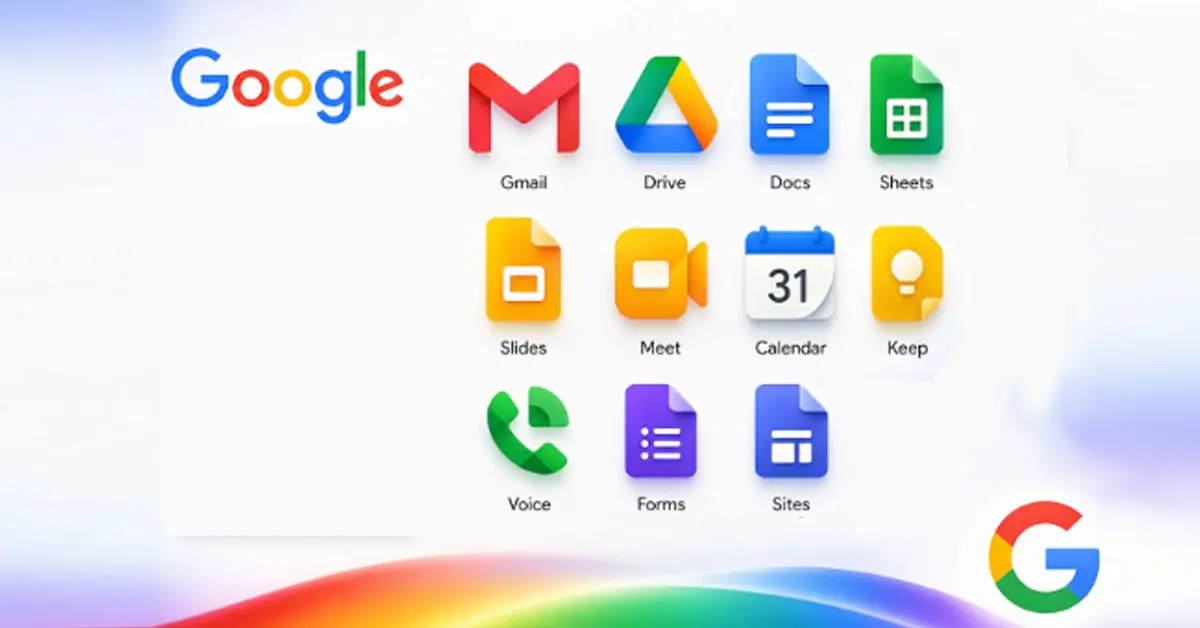
Google is rolling out its redesigned Workspace app icons with a fresh gradient style, larger shapes, and fewer multicolor blobs; here’s how Gmail, Drive, Docs, Meet, Calendar, and Chat are changing, and why this matters for productivity and AI branding.
Google is rolling out its redesigned Workspace app icons, and the change is a lot more intentional than a casual “pretty‑up.” The new suite of icons swaps the old four‑color, box‑with‑page aesthetic for a cleaner, larger, gradient‑driven look that aligns with Google’s Gemini‑era design language. For many users, this is the first visible sign that Google’s AI‑branding push is quietly bleeding into every app they touch daily.
What the new icons actually look like
Across Gmail, Drive, Docs, Sheets, Slides, Meet, Chat, Calendar, Keep, Voice, Forms, and Sites, the common threads are:
- Gradient‑style fills: Icons now use light‑to‑dark color transitions rather than flat, solid blocks. That means Gmail’s “M” pops with a red‑to‑deeper‑red gradient, Drive’s triangle gets a green‑to‑dark‑blue fade, and Docs/Sheets/Slides each get a single‑color gradient that feels weightier and calmer.
- Larger, more distinct shapes: Google has largely dropped the old “page‑container” background, so the app shape itself fills more space. That makes the icons feel bolder at a glance and easier to distinguish in crowded app grids.
- Fewer multicolor blobs: The company is moving away from the rule that every app needed all four Google colors visible somewhere. Many icons now lean on one dominant hue plus subtle accents, which instantly makes them feel less like a random‑rainbow‑blob wallpaper and more like a coherent family.
If you’ve already seen the gradient‑style Google “G,” Gemini, Maps, and Photos icons, this new Workspace set will feel like a natural extension of that same visual language.
How major apps have changed
The redesign isn’t just a “make‑everything‑prettier” sweep; individual apps have received targeted tweaks that nod to their identity and usage:
- Gmail: The envelope‑style “M” remains, but it’s now more rounded, with red as the main color and a subtle gradient that gives it a bit more volume, almost like ink‑wet paper. The busy four‑color border is gone.
- Google Drive: The triangular icon stays, but the red‑dot accent in the bottom‑right is gone, leaving a cleaner green‑yellow‑blue‑only gradient. The shape is slightly more rounded, and the app feels less like a “button” and more like a file hub.
- Docs, Sheets, Slides: Each keeps its core identity — Docs as a document, Sheets as a grid, Slides as a presentation — but each now uses a single dominant color with a gradient that feels more like a “real‑world paper object” than a flat UI box. Sheets and Slides are also tweaked to visually mirror the app‑canvas layout more closely.
- Google Meet & Chat: Meet drops its multi‑colored camera‑shutter look and goes fully yellow‑gradient, with a cleaner camera outline; Chat moves from a chat‑bubble‑with‑four‑dots to a pill‑shaped green bubble that feels friendlier and more “Hangouts‑touch.”
- Calendar & Tasks: Calendar reverts to a more classic “flip‑style” paper‑calendar look, with a blue‑gradient block and cleaner edges, ditching the scattered‑color‑border effect. Tasks keeps its blue‑square motif but simplifies it into a cleaner, more minimal tile.
- Keep & Voice, Forms, Sites: Keep’s light‑bulb icon is now just a yellow‑gradient bulb without a background box, giving it more breathing room. Voice, Forms, and Sites follow a similar pattern, trading noisy multi‑color backgrounds for single‑color‑plus‑gradient shapes that feel more self‑contained.
Overall, the change is less about radical overhauls and more about making each app feel visually unique again while still fitting under one design umbrella.
Why Google is doing this
Google is rolling out its redesigned Workspace app icons for a few quietly layered reasons:
- Distinctiveness: For years, many Google Workspace icons looked suspiciously similar — a color‑blob, a page, plus a tiny icon‑inside. The new gradient‑style treatment makes Gmail, Drive, Docs, and Meet visually more different at a glance, which helps users quickly spot the right app without thinking.
- AI‑branding cohesion: Google has been using the gradient look across the Google app, Gemini, Maps, and Photos to signal “AI‑aware, modern, and cloud‑first.” Pushing that same style into Workspace ties productivity tools into that same narrative, reinforcing the idea that Docs, Sheets, and Gmail are all now part of the AI‑assisted ecosystem.
- Avoiding visual fatigue: The old four‑color‑in‑every‑icon rule created a “color‑blob overload” effect, especially on home screens crowded with Google apps. Simplifying each icon to a cleaner, larger shape removes that visual noise and makes the entire suite easier on the eye over long‑day use.
How the rollout works and how to spot it
The new icons are being rolled out gradually over web and mobile apps, so not everyone sees the change at once.
When you do see it, the shift will be noticeable mainly in:
- App‑drawer icons on Android and iOS.
- Desktop shortcuts and browser tabs for Gmail, Drive, Docs, and other Workspace apps.
- Google’s own UI elements, like the app grid in Gmail or Drive, where the new icons replace the older flat ones.
If you’re on a modern Google account and an up‑to‑date Android or iOS device, you’ll likely see the new icons soon even if the rollout is not yet 100% global.
Why this matters for productivity and branding
On the surface, icon‑redesigns feel cosmetic, but in practice, they shape how people experience a whole ecosystem. With Google is rolling out its redesigned Workspace app icons, Google is doing a few important things:
- Improving usability: Bolder, cleaner, more distinct icons mean less “Which app is that again?” confusion, especially on busier home screens.
- Reinforcing the AI‑story: By using the same gradient style as Gemini and Maps, Google quietly teaches users that Workspace isn’t just about documents and chat — it’s part of the AI‑assisted daily‑workflow stack.
- Updating the brand’s look without a “big‑rebrand” fuss: Instead of a flashy marketing campaign, Google is changing the most‑touched part of the product — the tiny icons on your phone — to signal that the entire Workspace suite is more modern, more integrated, and more AI‑aware than ever before.